
Why IT OT Segmentation Is Critical to Stop Breaches and Protect Production
A breach that starts with an email in the office can end with stopped conveyors, locked operator screens, or a plant running in manual mode. That path is common because many production environments now depend on business systems for reporting, scheduling, remote support, file transfer, and software updates.
Information technology (IT) covers office systems such as email, laptops, file shares, and enterprise software. Operational technology (OT) covers the systems that monitor and control production, such as sensors, controllers, operator stations, and safety systems.
When those worlds connect without clear boundaries, a normal office breach can become an operational incident. IT/OT segmentation limits that spread. It creates controlled zones, reduces trust between systems, and gives teams time to respond before production is affected.

How an office breach reaches production
Most attacks do not start at a programmable controller or plant-floor device. They often start with simpler targets:
A stolen password from a business user
A compromised laptop connected through a virtual private network
Malware on a shared file server
A remote access tool left open for support
A supplier account with too much access
Once attackers enter the office network, they look for connected systems. If the same user accounts, network paths, or file shares touch production, the attack can move sideways.
For example, a maintenance engineer may use a business laptop to download vendor files, then connect to an engineering workstation. A planning server may exchange production data with the plant network. A remote vendor may connect through the corporate network to troubleshoot a machine. Each connection can be useful, but each one can also become a route into OT.
This is why OT network segmentation matters. It does not assume the office network is always safe. It treats production as a separate environment with stricter access, tighter monitoring, and fewer allowed connections.
The Dragos OT Cybersecurity Year in Review 2025 continues to draw attention to risks that affect industrial environments, including ransomware activity, poor visibility, and exposed remote access. CISA’s OT security guidance also stresses the need to separate control systems from business networks, restrict access, and prepare response plans before an incident occurs.
The Purdue model explains zones in plain language
The Purdue model is a simple way to picture how industrial systems should be separated. It is not a product. It is a reference model that helps teams decide what should talk to what.
Think of it as floors in a building.
Level 0 and Level 1 cover the physical process
These are the devices closest to the real world. They include sensors, motors, valves, drives, and controllers. If these systems fail or receive bad instructions, production and safety can be affected.
Access should be very limited here. Direct connections from office systems should not reach this level.
Level 2 covers local control
This level includes operator screens, alarms, local control servers, and engineering stations. People use these systems to run and maintain the process.
Because this level directly supports operations, it needs tight controls. Engineering workstations should not browse the internet, handle email, or accept files without checks.
Level 3 covers site operations
This is where plant-wide systems often sit, such as production data historians, batch systems, and manufacturing execution systems. This level connects the plant floor to planning, reporting, and maintenance workflows.
It is also where many segmentation mistakes happen. A historian may need to send data to business tools, but that does not mean business users need open access back into the control environment.
Level 3.5 is the buffer zone
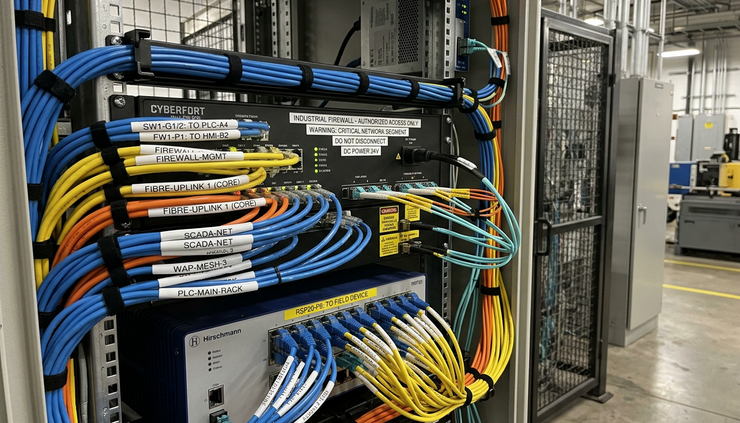
Many organisations use a middle zone between business and production networks. This is often called a demilitarised zone, or DMZ. In simple terms, it is a controlled waiting room.
Systems here can exchange selected data with both sides, but traffic is inspected and limited. File transfer, patch distribution, remote access gateways, and data replication often belong here.
Level 4 and Level 5 cover business systems
These are office services, cloud applications, finance tools, email, identity systems, and enterprise planning platforms.
These systems are important, but they should not have direct access to plant-floor controls. If ransomware hits the office environment, segmentation helps prevent it from automatically reaching production.
Remote vendor access is useful but risky
Vendors often need remote access to diagnose equipment faults, update software, or support production during a breakdown. Blocking all vendor access is rarely realistic. Leaving it open all the time is dangerous.
The risk comes from weak control. A vendor account may be shared by several people. Access may remain active after a project ends. A support laptop may connect from another country, another customer site, or an unmanaged network. If attackers compromise that vendor, the plant may become the next target.
A safer approach includes:
Use approved remote access paths only Vendors should connect through a controlled gateway, not directly to machines.
Require strong sign-in checks Use multi-factor authentication, which asks for more than a password.
Approve access for a limited time Open sessions only when support is needed, then close them.
Record and monitor sessions Keep logs of who connected, when they connected, and what they accessed.
Separate vendor accounts by role A packaging line vendor should not be able to access energy management systems.
These steps support IT OT convergence security because they allow useful data and support to flow without treating every connection as trusted.
How to keep operating during an incident
Segmentation is not only a prevention measure. It also helps operations continue when something goes wrong.
A good incident plan should answer a practical question: what must keep running, and what can be disconnected?
Start with critical processes. Identify which lines, substations, terminals, or control rooms must run to protect safety, product quality, and service commitments. Then map the systems they depend on, including identity services, engineering stations, remote access tools, data historians, and backup servers.
Useful operating strategies include:
Run key production networks in a restricted mode if the office network is compromised.
Keep tested offline backups for control system settings, recipes, and engineering files.
Prepare manual operating procedures for the most important processes.
Maintain a clean recovery workstation that is not used for email or web browsing.
Pre-approve isolation steps so teams can disconnect risky links quickly.
Practise communication plans that do not rely only on corporate email.
For OT ransomware, speed matters. If teams know which network links to close, which systems to preserve, and who has authority to act, they can contain damage faster.
CISA guidance supports this approach. It recommends reducing unnecessary network paths, limiting remote access, maintaining backups, and practising incident response for industrial environments. Those are not theoretical controls. They are the basic conditions for keeping production stable under pressure.
Segmentation only works when it is maintained
A network diagram from three years ago is not a control. Plants change. Vendors change. Temporary connections become permanent. New cloud dashboards appear. A spare port gets used during a maintenance window and never gets reviewed.
Good segmentation needs routine care:
Review firewall rules and remove unused access.
Check that asset lists match what is really connected.
Test whether business users can reach OT systems they should not reach.
Confirm that remote access accounts still have a valid owner.
Monitor traffic between zones for unusual patterns.
Include segmentation checks in change management.
Industrial cybersecurity improves when segmentation is treated as an operating discipline, not a one-time project.
Make segmentation a production protection priority
IT/OT segmentation gives production teams room to act. It limits the path from an office breach to the plant floor. It makes remote support safer. It helps teams isolate trouble without shutting down every system at once.
The work starts with a clear architecture: know the zones, control the paths, verify remote access, and plan how the site will operate if business systems are unavailable.
If production uptime, safety, and recovery time matter, now is the time to review the architecture that connects IT and OT. Explore security architecture solutions and build a segmentation plan that can hold up during a real incident.
If your office and production networks are more connected than they should be, we can help you design the separation through our Security Architecture work.


